
How Construction Companies Replace Paper Timesheets
Construction Timesheet Software Guide
Looking for a complete overview of construction time tracking?


Looking for a complete overview of construction time tracking?
Topics: Crew Timesheet, Construction, crew time tracking
This article was updated on June 4, 2017
Evaluating time and expense tracking software can be a daunting task given the number of options out there. You begin thinking of the steps: "I'll read some white papers, look at screen shots, develop a short list, schedule demo meetings and do some free trials." Your thinking is right on track. Then you're off to Google or Bing find the information you need so you can narrow things down. But when you do search one the phrase "timesheet software," Google says there are 10,000,000 pages to look at. You start to twitch as your cortisol levels start to soar. Then one of two impulses will take over:
Topics: Time Off Management, timesheet, Timesheet Software, Time Tracking Software, time tracking, SaaS Timesheet, Online Timesheet, Web TimeSheet, leave timesheet, Time and Attendance Software, Crew Timesheet
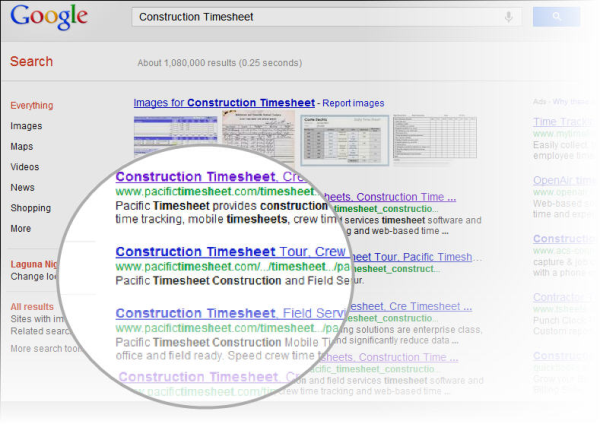
So your boss says he wants you to develop a short list of timesheet and work tracking software applications. He says it shouldn’t take long if you use Google. You’re busy with other things, but you agree you’ll get back to him in a few days. Big mistake, unless you know how to search. You see, Google has been SEO’d, that’s Internet marketing-speak for “search engine optimized.” That means that many vendors have smart people and consultants who figure out how to trick search engines into giving them high rankings, particularly on simple single-word searches, even if their applications do not warrant such high visibility in the marketplace.
Topics: Time Off Management, timesheet, Timesheet Software, Time Tracking Software, SaaS Timesheet, Online Timesheet, Web TimeSheet, leave timesheet, Crew Timesheet

An enterprise application is a big software system that can scale to support large business or government organizations. It's not software for Star Trek's USS Enterprise.
For larger companies, time and expense is a big deal. Enterprise time and expense tracking record e verything about employees' work and the expenses:Topics: Time Off Management, timesheet, Timesheet Software, Time Tracking Software, SaaS Timesheet, Online Timesheet, Web TimeSheet, Time and Attendance Software, Crew Timesheet

Your thinking about diving into the automated construction timesheets pool. But rather than dive into the deep end where it's cold and uncomfortable, put your toe in the water with some starter questions.
Topics: Crew Timesheet

Add Employee
Name: John Smithers
Pay Class:
- Pay Class 2
- Pay Class 4
Topics: Time Off Management, timesheet, Timesheet Software, Time Tracking Software, SaaS Timesheet, Online Timesheet, Web TimeSheet, Time and Attendance Software, Crew Timesheet
Previously we discussed how data entry must be made easier when automating crew timesheets. Manual crew timesheets are cumbersome at best. They must be set up by hand, with administrative or supervisory staff entering a lot data for the day or week. All this takes a lot of valuable time and generates data entry errors when copying pay class codes, job codes, billings codes, union codes and other key data by employee. But there is an even more important factor that makes data entry even easier: pre-populating key employee data when you can. In this way, beside hours entry, there are methods where we can completely eliminate 40, 50 or even 75% of the other data that foremen and supervisors have to enter. An enterprise class crew time tracking system should be able to pre-populate an employee’s default pay class, job code, or union code when that employee is assigned ahead of time to a crew, or when added to a crew by a foreman. In some cases, pay classes or union codes might need to be overridden by foremen or supervisors. In other cases, they might need to be fixed or “read only” to prevent “accidental” job or pay rate promotions by friendly supervisors. Whatever the requirements, the crew time tracking system should be able to pre-populate key employee data and make it easier for foremen and supervisors to do their jobs. Pre-populating this data has many benefits: 1) reducing errors 2) speeding data entry, and 3) ensuring that correct job and union codes are applied. In sum, an additional benefit of automating crew timesheets is eliminating certain data entry altogether by pre-populating key data from third party systems when employees are assigned or added to crews.
Topics: Time Off Management, timesheet, Timesheet Software, Time Tracking Software, SaaS Timesheet, Online Timesheet, Web TimeSheet, Time and Attendance Software, Crew Timesheet
You've spent decades building your company name. Why does your time tracking system promote someone else's?
Topics: Time Off Management, timesheet, Timesheet Software, Time Tracking Software, SaaS Timesheet, Online Timesheet, Web TimeSheet, Time and Attendance Software, Crew Timesheet
 He Stumbles Upon a Pill
In a recent movie entitled "Limitless," Bradley Cooper plays a down-on-his-luck fiction writer who only sees the limits of his life. He is alone in a small New York City apartment. He talks to no one. Writes little and submits even less to his editor. He stumbles upon a pill and suddenly has 100% access to all memories and data in his brain upon command, his limits disappear and he becomes an amazingly rich successful man overnight.
Pieces of Paper
Before, it was as if he wrote down on pieces of paper everything he knew and hid them in places he forgot. What kind of system would that be? If you're thinking that sounds like paper crew timesheets or employee timesheets read on. If you're not thinking this, humor us and read on anyway. Storing information once on paper only means you have to transfer it into another media to allow for access and use of that information. This is true for sticky notes, phone messages, paper address books, phone numbers on slips of paper. You only write it down to transfer it to somewhere more permanent and useful. In business, it's called "double data entry," that is, recording information on paper sheets and then having data entry clerks re-enter the data again into a computer system, might seem like a limiting practice, but it's still very common. What's more, what kind of system is the data being entered into? Is that data then easily accessible? Ever write something on xerox paper, put it own your desk, later enter it into a spreadsheet, then attach it to an email and send it to someone else. Now you're cooking with gas (around 1995). Points of failure are everywhere. Did you write down on paper correctly? Did you copy it to the spreadsheet right? Did the email attachment make it through the spam filter at the other end? Could the recipient open it up with his XP computer when your file was in Vista (around 2007). In 2011, is this anyway to run an airline, a railroad or your life? Your just like Bradley Cooper's character with his slips of paper hidden in places he can't remember. Paralyzing. Static. No movement. Slow.
Topics: Time Off Management, timesheet, Timesheet Software, Time Tracking Software, SaaS Timesheet, Online Timesheet, Web TimeSheet, Time and Attendance Software, Crew Timesheet
Here's a scenario: Your boss comes by your desk at 5 pm Friday afternoon. "What problems did we have with Client X last year? I really need to know that for my Monday meeting." There goes your fishing trip this weekend.
You scratch your head and think about your records, project timesheets stored in boxes under your desk. You start thinking about the fact that a secondary use of paper timesheets is to record notes and comments on projects and activities. But you did not keep many notes this way. "Why didn't I record notes on my timesheet?" you're thinking. Well, here's the answer. Due to limited space on your paper timesheets, your comments have been related only to timesheet adjustments, not to flag major issues. "Why's that?" you wonder. Well first, there is not enough room. Second, paper timesheets are usually filed away and are not easily searchable. Thus proving the principle: if you can't do it easily you don't do it. In this case, you did not enter important comments about your client projects on your timesheets, because it was difficult to do.
But there's another reason you did not do it? Really, another reason? Yes, another reason! You knew the comments would be nearly impossible to search at a later date, so you did not bother to record anything important on the timesheet. "Oh I get it!," you now realize, "why bother recording notes if you or another colleague cannot find them easily." You won't have time to search through fifty weekly timesheets for last year to get an answer about that client account for your boss's Monday meeting. But now you will make time and cancel your fishing trip.
Topics: Time Off Management, timesheet, Timesheet Software, Time Tracking Software, SaaS Timesheet, Online Timesheet, Web TimeSheet, Time and Attendance Software, Crew Timesheet